




















In SalonLife, you can set up prepayments to cut down on cancellations and make sure booked times are more secure for you. Prepayment gives you better control over your calendar and helps you handle situations where a client doesn’t show up or cancels too late.
For you, that means steadier income, fewer empty gaps in your calendar, and more confidence that your time is genuinely valued.
When setting up prepayment, you first decide who it applies to and in which situations — for example, only new clients or everyone who books. Next, you choose whether the client pays the full amount up front or only part of it, and set the exact amount or percentage you prefer. You can also add a minimum prepayment amount, to avoid overly small payments for cheaper services.
You can also set exceptions — for example, for returning clients or last-minute bookings, where prepayment can become voluntary. Finally, you decide whether prepayment applies only to online bookings or to manually added times as well, so the system fits your way of working as closely as possible.
How to Find the Prepayment Settings
_20(1).png)
Setting up prepayment starts with turning prepayments on in the first place.
Open the prepayment settings like this:
1. Log in to your SalonLife account
2. Go to Apps → Wallet → General Settings
3. Then select Turn On Prepayments.
This opens a separate view where you choose how prepayment will work in your salon. You don’t have to set everything up from scratch here — instead, you pick from a set of options, such as whether prepayment is voluntary, required only for online bookings, only for new clients, or for everyone.
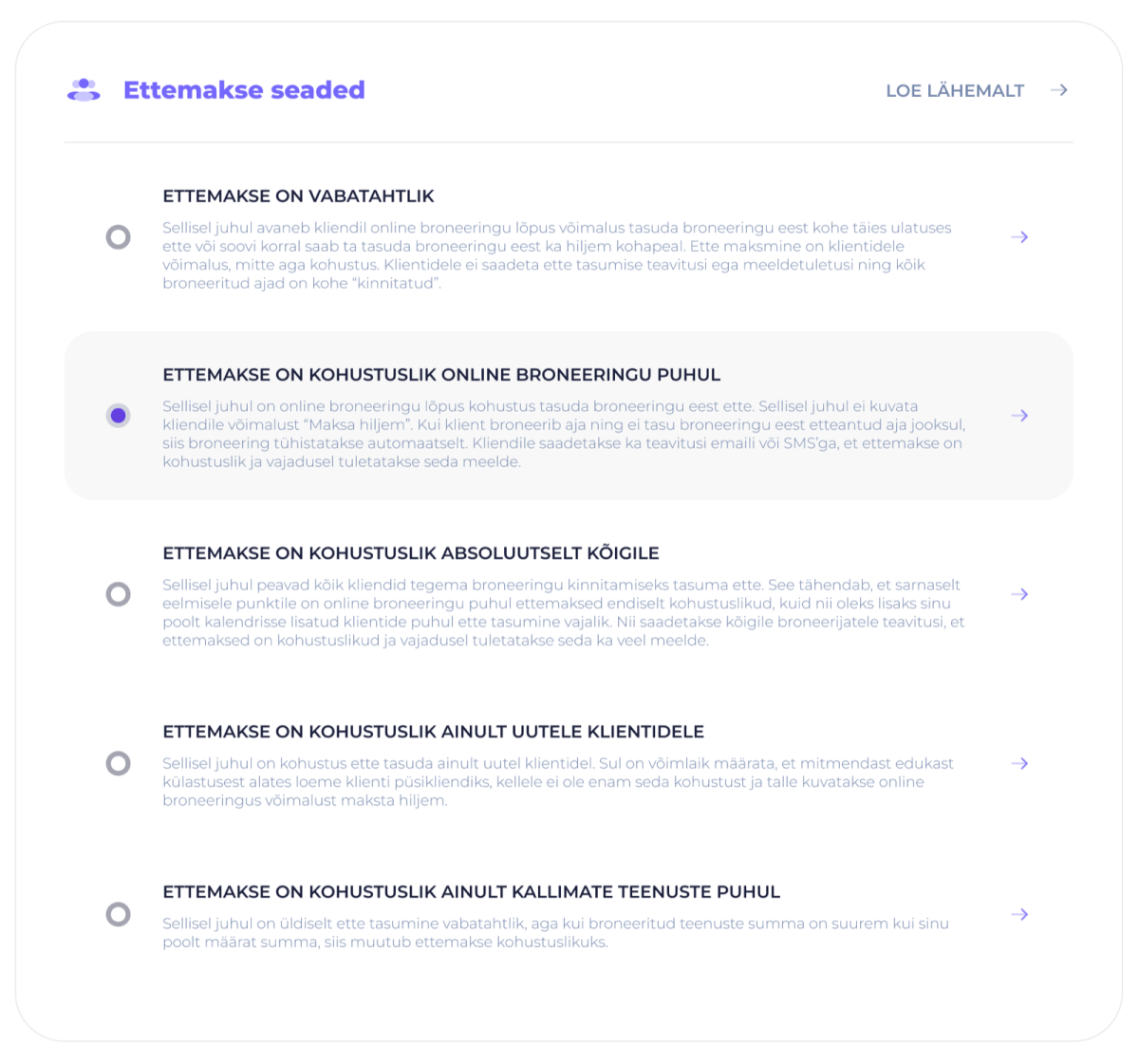
Once you’ve chosen the right option, the next steps let you fine-tune the prepayment amount, conditions, and exceptions to match your way of working exactly.
Option 1: Prepayment Is Voluntary
With this option, the client sees the option to pay in full at the end of the online booking, but can also choose to pay on-site. Prepayment isn’t required, and the booking is confirmed immediately — whether or not the client paid in advance.
Important to know: Clients aren’t sent any prepayment-related notifications or reminders. Every booking automatically gets the status “confirmed.”
A good fit if:
- You have an established, trustworthy clientele
- Paying on-site is standard practice in your sector
- You want booking to be as quick and simple as possible for clients
Option 2: Prepayment Is Required for Online Bookings
At the end of an online booking, paying the prepayment is mandatory — without it, the booking isn’t confirmed. If a client books a time but doesn’t pay the prepayment within the given time, the booking is canceled automatically. Clients are sent notifications by email or SMS.
Important to know: This setting only applies to online bookings. Prepayment isn’t automatically applied to times added to the calendar manually (e.g., bookings made by phone) — these need to be managed separately if needed.
A good fit if:
- You want to reduce unnecessary cancellations and no-shows
- You mainly work with bookings made online
- Manually added times are the exception, not the rule
Option 3: Prepayment Is Required for Absolutely Everyone
This is the strictest option. Prepayment is required for every client — both those who book online and those whose bookings are added to the calendar manually (e.g., by phone). Everyone who books is automatically sent notifications and reminders when needed.
A good fit if:
- You want maximum control over your time
- You want to rule out free cancellations entirely, no matter how the booking was made
- You offer longer, high-value services where a no-show is costly
Option 4: Prepayment Is Required Only for New Clients
Prepayment is only required from new clients. Once a client has visited enough times, they automatically get returning-client status, after which you can offer them more flexible terms without prepayment.
Additional settings:
- You can set after how many successful visits a client counts as a returning client
- You can choose when prepayment becomes voluntary for returning clients
A good fit if:
- You want to protect yourself from the risk of new clients
- You want to reward loyal clients with a better experience
- Your returning clients are reliable and rarely cancel
Option 5: Prepayment Is Required Only for Higher-Priced Services
Generally, prepayment is voluntary, but once the total price of the booked services exceeds the limit you’ve set, prepayment automatically becomes mandatory. This protects longer, more expensive services without making booking simpler ones any more complicated.
Additional settings:
- You can set the price limit above which prepayment applies
- You can choose whether the client prepays part of the amount or the full price of the service
- You can set up other conditions and exceptions
A good fit if:
- You offer both short, cheaper services and long, more expensive ones
- You want to protect your more valuable time slots without making simpler bookings complicated
What Can You Fine-Tune After Choosing an Option?
Whichever option you choose, the next steps let you set up more detailed rules:
- Whether the client pays the full amount or only part of it
- The exact prepayment amount and the minimum amount
- Exceptions for last-minute bookings
- The option to pay the full amount right away
- The prepayment terms shown to clients
Note! If you use prepayment settings, you’re required to clearly spell out the prepayment terms for clients.
Once everything is set up, click Save at the bottom of the page for your changes to take effect.
TIP: If you’re not sure where to start, begin with Prepayment Is Required for Online Bookings and set the prepayment amount to around 20-30%. If you’d like, add the option to pay the full amount right away. If you get a lot of cancellations, you can later move to a stricter setup — for example, making prepayment mandatory for everyone or raising the percentage
You can read more about prepayment settings here:
1. Prepayment Is Voluntary
2. Prepayment Is Required for Online Bookings
3. Prepayment Is Required for Absolutely Everyone
4. Prepayment Is Required Only for New Clients
5. Prepayment Is Required Only for Higher-Priced Services
-