




















SalonLife.com helps you make your salon more visible and create a professional, trustworthy first impression for new clients. In this article, we’ll cover how the platform works, what your salon’s profile page looks like, and why it’s valuable for both you and your clients.
General Overview of the Platform
.png)
SalonLife.com brings together beauty professionals from different fields in one place, where clients can conveniently:
- Browse all beauty services (e.g. hairdresser, nail technician, cosmetologist, etc.).
- Use the map view, search, and filters to find a salon that fits their needs.
- Explore salon profiles and view photo galleries.
- Read other people’s feedback (ratings and reviews).
- Book appointments online based on the salon’s available times.
The platform makes it easier to find new clients and helps existing clients find you conveniently. On top of that, all the important salon information sits together in one clear view.
How Clients Find a Salon
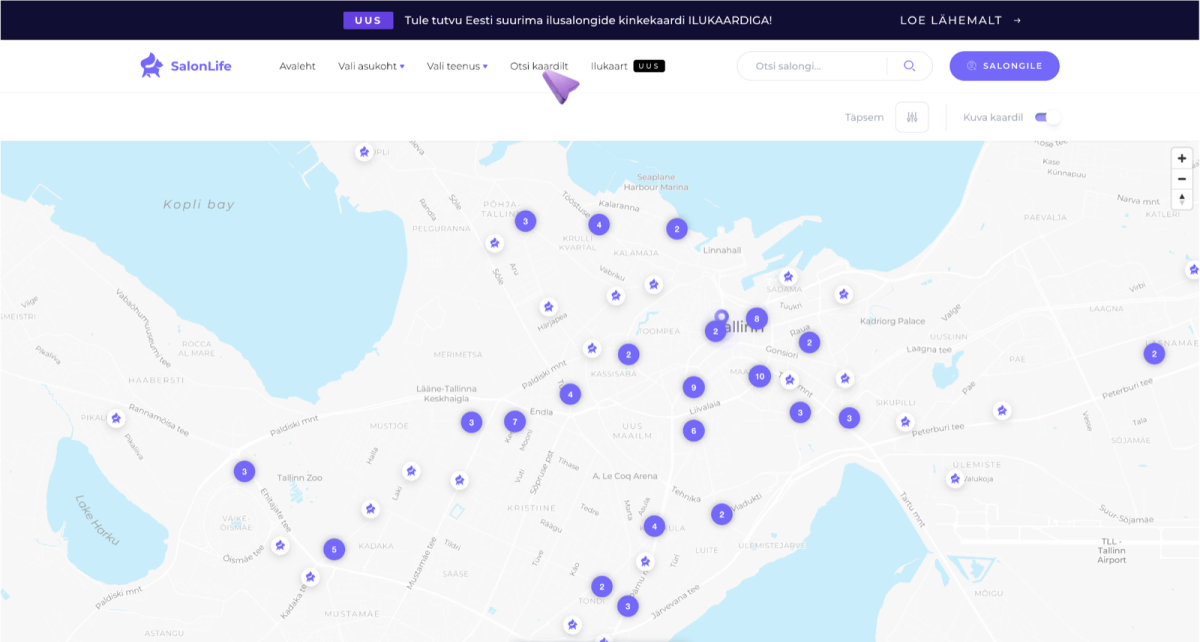
- Search: Clients can type a keyword into the search box (e.g. “hairdresser”) and then view the results page along with the map view.
- Beauty categories: Categories let clients browse different services (e.g. hair, nails, lashes, etc.).
- Location-based search on the map: The map shows every salon along with contact info and selected photos, helping the client quickly work out whether a salon is in a convenient area for them.
- Perks: When choosing a service, clients can see what perks a salon offers (e.g. free parking), specific services, and more.
Once a potential client has found a suitable salon, they can move smoothly on to the salon’s profile page to gather the information they need—about services, getting to know the staff, and previous clients’ reviews.
Salon Profile Page
Your salon’s profile page is like your “business card” or “mini homepage” on the SalonLife.com platform. It includes several important sections that let you show what makes you unique:
1. First Impression: Photos and Short Description
- Your salon’s logo and introductory photo (main photo) are shown at the top of the profile page.
- The short description explains what services you offer, how long you’ve been in business, and why a new client might choose your salon.
- The first impression matters a lot—choose clear, high-quality photos for your profile page and write a memorable introduction.
TIP:
Think through which photos and style you want to show on your salon’s profile page. Make sure they convey exactly the feeling a visitor experiences in your salon.
2. Service Information and Price List
- On the profile page, clients can easily browse your list of services.
- If possible, add a short description for each service, making it easier for clients to find the service that suits them.
- The online booking system lets visitors conveniently choose the right service, specialist, and time, reducing the need for extra phone calls or messages.
3. Your Salon’s Team (Staff Introduction)
- Photos of your staff, along with their names and a short introduction, appear near the bottom of the profile page.
- This is especially useful for larger salons, since clients can pick exactly the right specialist for them.
- For sole proprietors, this section simply shows a single profile photo and name.
4. Client Feedback, i.e. Reviews
- The profile page shows reviews left by previous clients, along with an average overall rating.
- Reviews help a new client judge the quality of your service and get a sense of whether it matches client expectations.
- Since only clients who’ve actually visited your salon can leave a rating, you can be confident the feedback is genuine and trustworthy.
5. Portfolio
- Your portfolio is a photo gallery of your finished work, whether that’s various hairstyles, manicures, or other treatments.
- It’s also a great place to add extra photos of your salon’s atmosphere, results, and what you’ve achieved. This builds trust faster and can be the deciding factor when someone books an appointment with you.
6. Perks and Amenities
- The profile page also shows whether your salon offers things like free parking, payment options, discounts for returning clients, or other special features.
- These small extras can sometimes be the deciding factor for clients choosing between several similar salons.
7. Contact Details
- The bottom of the profile page gives a clear overview: address, phone number, email, and your salon’s social media links.
- This makes it easy for clients to get in touch if they need extra information before booking.
Why Is Client Feedback So Important?
.png)
Reviews left by clients help boost your salon’s credibility. The more feedback you have, the more confidently a new potential client will dare to book an appointment.
That’s why it’s important to:
- Encourage your visitors to leave a review.
- Respond politely to both positive and negative feedback.
- Consistently deliver quality service so your “average rating” stays high.
TIP:
Genuine feedback is the most convincing argument for a new client. Clients often trust other visitors’ experiences more than any advertisement.
SalonLife.com gives your salon a great opportunity to create an attractive, thorough profile page that helps you reach new clients quickly and reliably.
Thanks to clear photos, thorough information, and reviews left by clients, a new visitor can easily decide in favor of your salon. Take the time, craft your profile page carefully, and make that first contact with clients as smooth as possible!