




















You partly can! In SalonLife, you can set prepayment to become mandatory only for services in a certain price range. For example, you can set it up so that prepayment is only required for services where the booking total exceeds €50.
This means that:
- for cheaper services, prepayment stays optional
- for higher-priced services, the client has to pay the prepayment before the booking is confirmed
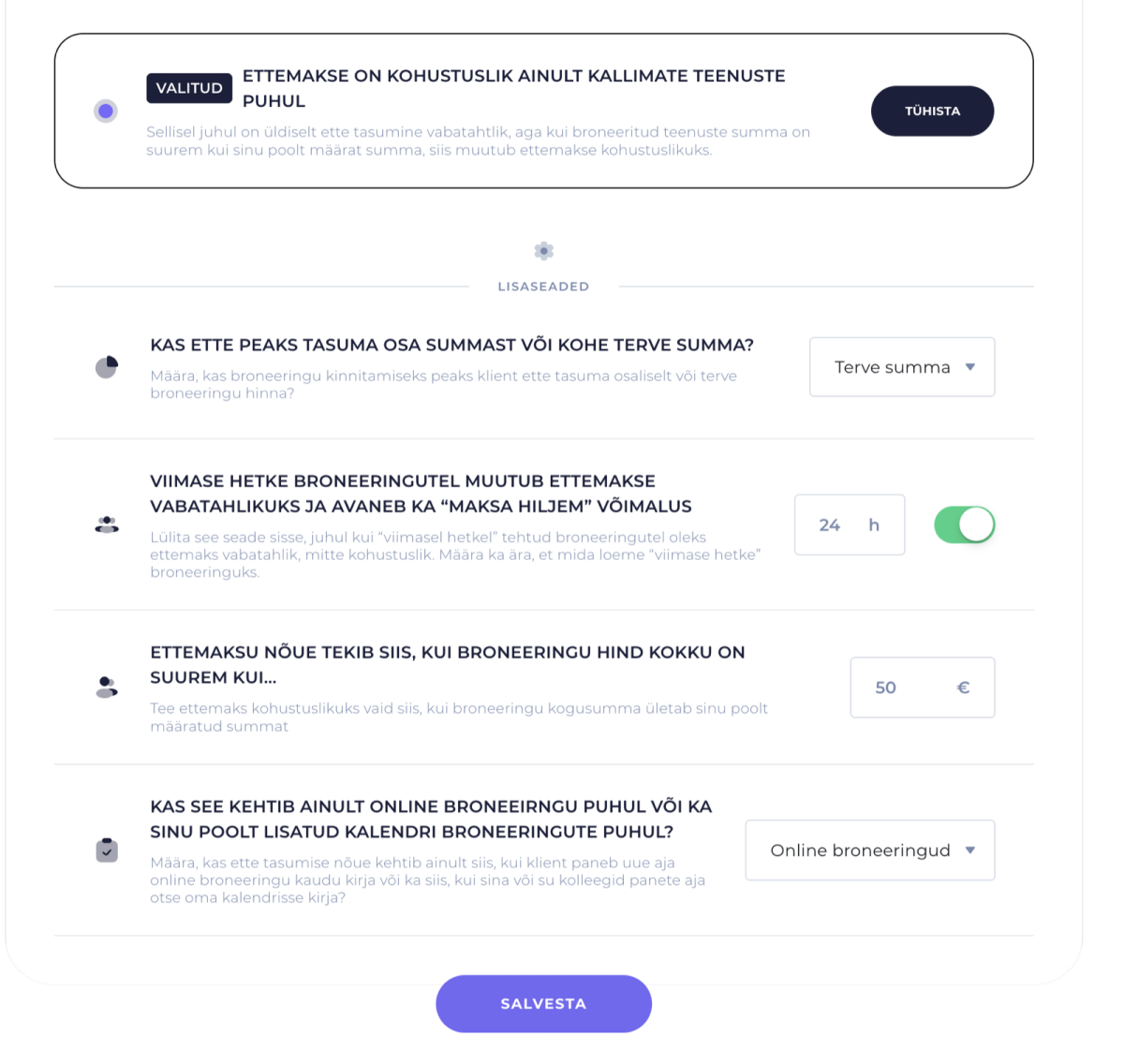
How Do You Set This Up?
- Go to Apps → Online Payments & Invoices → Settings → Turn On Prepayments
- Select the setting "Prepayment is required only for higher-priced services"
- Enter the amount above which prepayment becomes mandatory
- Save your changes
What Can’t You Do Right Now?
Right now, it isn’t possible to base the prepayment requirement on:
- a specific amount of time
- the service’s duration
- the service category
- any other separate condition
The prepayment logic is currently based on the price of the service or booking.
TIP
If you want prepayment to be mandatory specifically for longer or more time-consuming services, set the price threshold so that pricier services fall above it and shorter, cheaper services fall below it.
In SalonLife, you can make prepayment mandatory based on a set price amount, for example only for higher-priced services. Right now, you can’t set this separately by service duration or any other condition.